学术资源加速
当自然情况下无法访问部分学术 / 海外资源时,可以通过以下代理配置进行加速。
为windows的所有浏览器设置代理 (仅限浏览器)
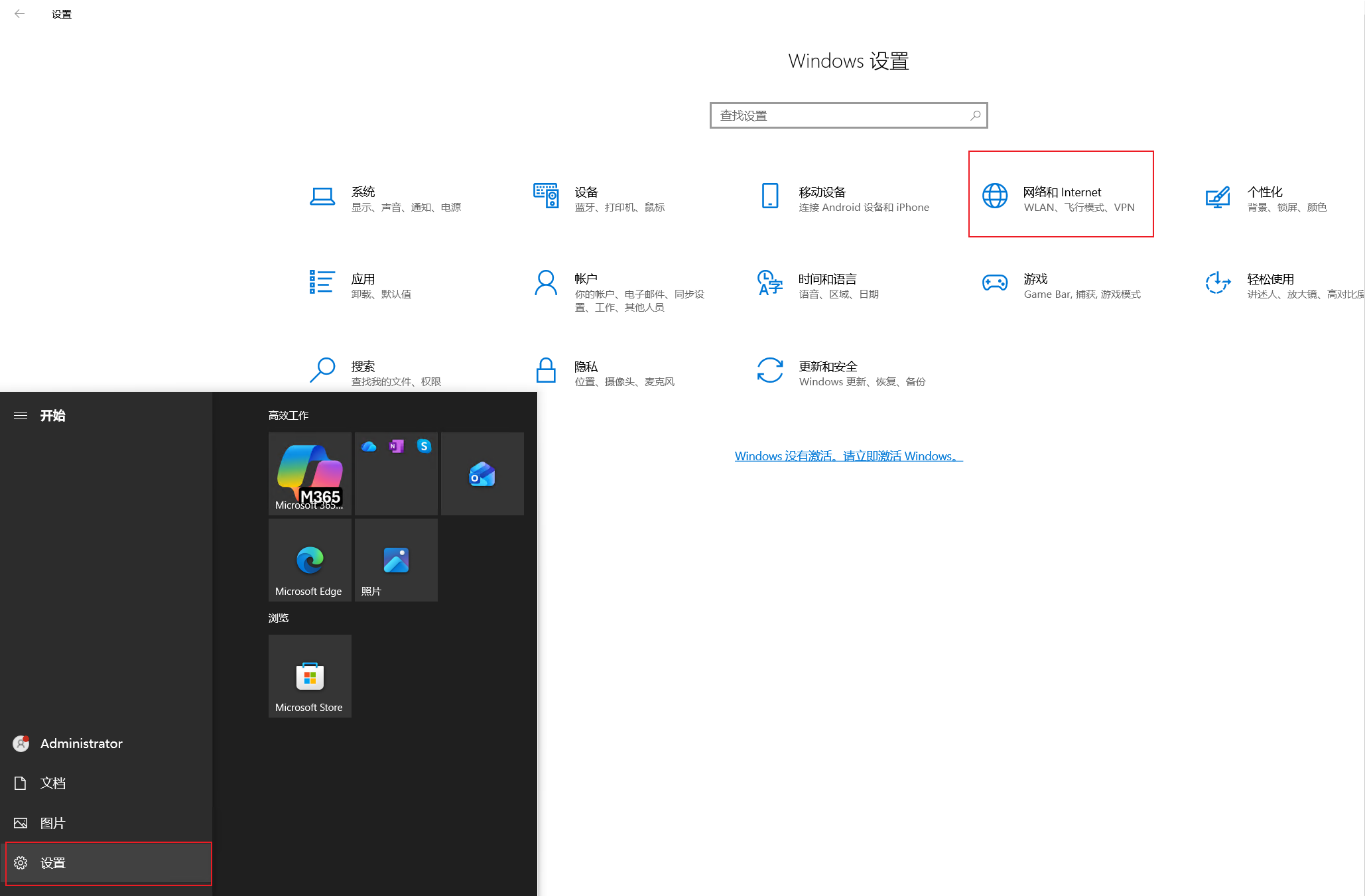
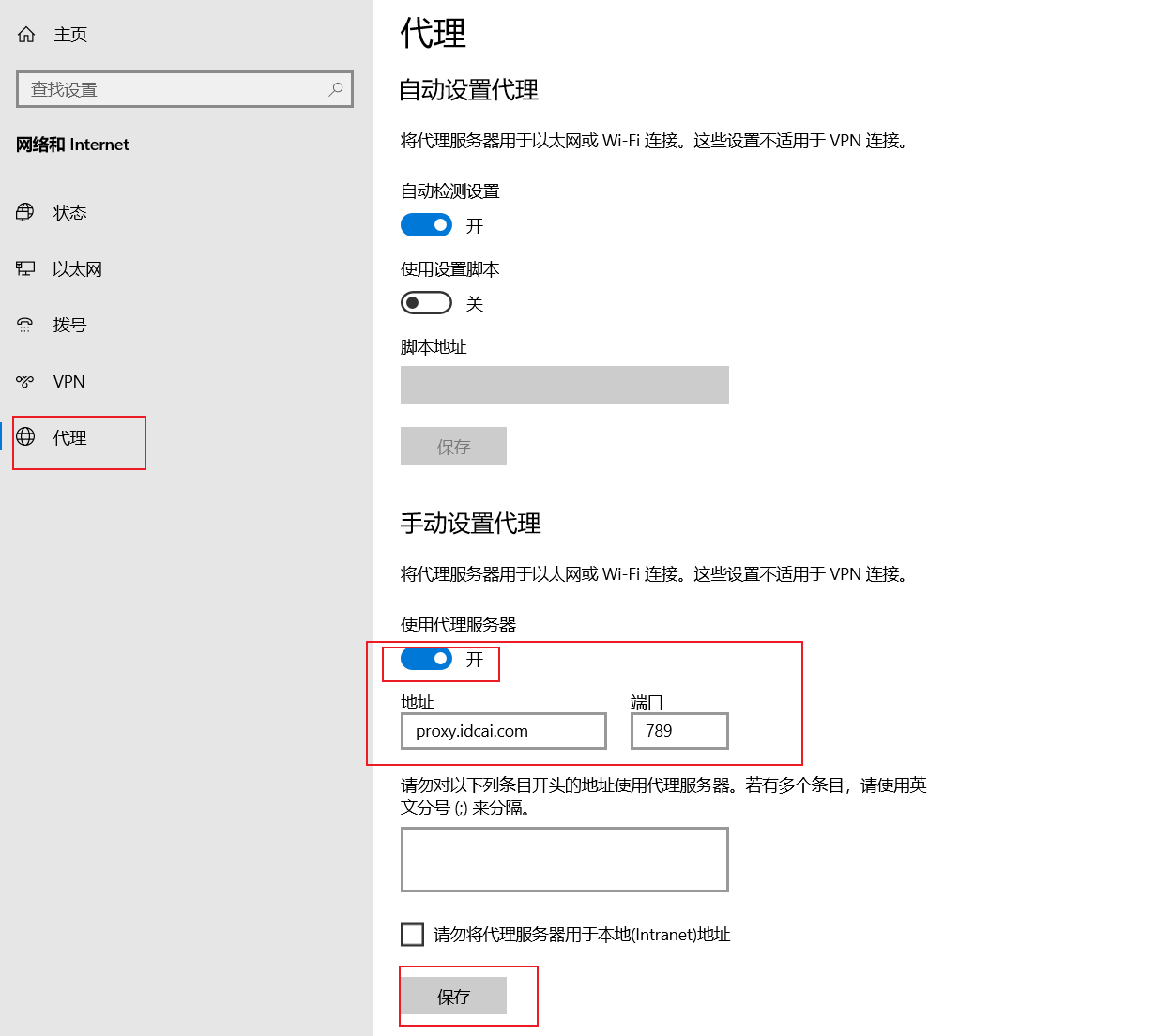
为ubuntu设置代理 (支持浏览器和终端以及所有应用)
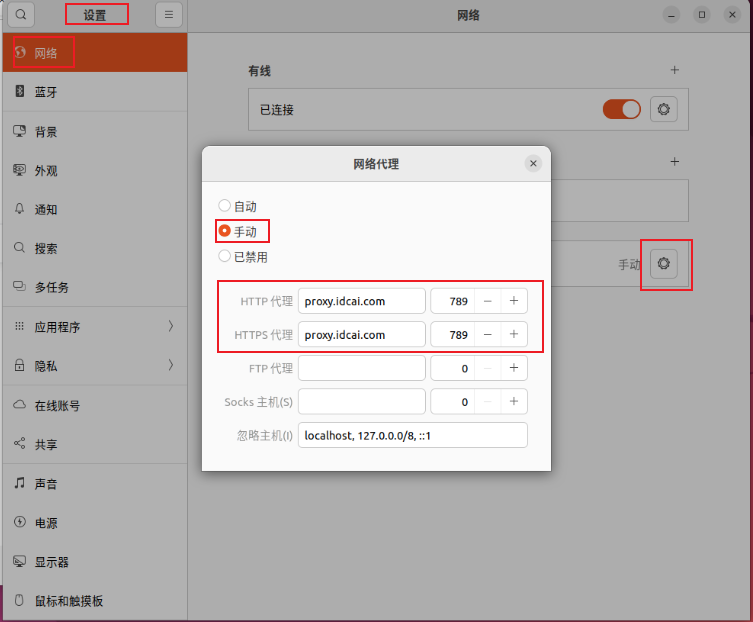
海外加速配置
临时使用配置(推荐,仅当前会话生效)
适合临时测试 / 临时使用,只在当前终端会话里有效,关闭终端或新开一个终端后即失效。
不会改动系统全局环境变量,风险较小,建议优先使用本方式。
Linux 系统(当前终端)
去除当前终端中的临时配置:
Windows 系统(PowerShell,当前终端)
去除当前终端中的临时配置:
Windows 系统(cmd,当前终端)
去除当前终端中的临时配置:
只对单条命令生效(示例)
全局生效配置(慎用,会对所有终端生效)
此方式会修改用户级 / 系统级环境变量,关闭终端、重启后依然有效。
在少部分网站、服务上可能出现异常或报错或无法打开,请确认有需要再使用,并记住如何恢复。
关闭你设置的终端,重新进入终端后仍然会使用代理配置。
Linux 系统
所有用户(修改 /etc/profile)
添加全局加速(所有用户):
LINE='export http_proxy=http://proxy.idcai.com:789
export https_proxy=http://proxy.idcai.com:789'
FILE='/etc/profile'
grep -qxF "$LINE" "$FILE" || echo "$LINE" >> "$FILE"
source /etc/profile
去除全局生效的加速(所有用户):
FILE='/etc/profile'
sed -i '/export http_proxy=http:\/\/proxy.idcai.com:789/,/export https_proxy=http:\/\/proxy.idcai.com:789/d' "$FILE"
source "$FILE"
# 需要重新打开终端
当前用户(修改 ~/.bashrc)
添加当前用户的全局加速:
LINE='export http_proxy=http://proxy.idcai.com:789
export https_proxy=http://proxy.idcai.com:789'
FILE="$HOME/.bashrc"
grep -qxF "$LINE" "$FILE" || echo "$LINE" >> "$FILE"
source "$FILE"
去除当前用户的全局加速:
FILE="$HOME/.bashrc"
sed -i '/export http_proxy=http:\/\/proxy.idcai.com:789/,/export https_proxy=http:\/\/proxy.idcai.com:789/d' "$FILE"
source "$FILE"
# 需要重新打开终端
Windows 系统(PowerShell,全局环境变量)
添加全局加速(用户级)
[Environment]::SetEnvironmentVariable("http_proxy", "http://proxy.idcai.com:789", "User")
[Environment]::SetEnvironmentVariable("https_proxy", "http://proxy.idcai.com:789", "User")
# 配置完成后需要重新打开powershell
添加全局加速(系统级)
[Environment]::SetEnvironmentVariable("http_proxy", "http://proxy.idcai.com:789", "Machine")
[Environment]::SetEnvironmentVariable("https_proxy", "http://proxy.idcai.com:789", "Machine")
# 配置完成后需要重新打开powershell
去除全局加速(用户级 + 系统级)
# 删除用户级别的永久变量
[Environment]::SetEnvironmentVariable("http_proxy", $null, "User")
[Environment]::SetEnvironmentVariable("https_proxy", $null, "User")

# 删除系统级别的永久变量(需要管理员权限)
[Environment]::SetEnvironmentVariable("http_proxy", $null, "Machine")
[Environment]::SetEnvironmentVariable("https_proxy", $null, "Machine")
高级配置
具体情况请google搜索配合国外ai问答了解
验证加速是否可用
!!!验证是否可用!!!
==== 以下所有配置都是基于http和https协议 ====
==== !!!不要使用ping来验证,因为ping是ICMP协议 ====
第一种,curl获取静态文本
# linux验证方式
curl -I google.com

# windows 验证方式
windows 必须要使用curl.exe,如果使用curl将不会调用环境变量
curl.exe -I google.com
# 出现301和200 OK即可
HTTP/1.1 301 Moved Permanently
Content-Length: 219
Cache-Control: public, max-age=2592000
Connection: keep-alive
Content-Security-Policy-Report-Only: object-src 'none';base-uri 'self';script-src 'nonce-JYafnZEhq21fYfhYh06XmQ' 'strict-dynamic' 'report-sample' 'unsafe-eval' 'unsafe-inline' https: http:;report-uri https://csp.withgoogle.com/csp/gws/other-hp
Content-Type: text/html; charset=UTF-8
Date: Sat, 07 Mar 2026 07:20:03 GMT
Expires: Mon, 06 Apr 2026 07:20:03 GMT
Keep-Alive: timeout=4
Location: http://www.google.com/
Proxy-Connection: keep-alive
Reporting-Endpoints: default="//www.google.com/httpservice/retry/jserror?ei=o9GradfxJoDZ1e8PmY7MSA&cad=crash&error=Page%20Crash&jsel=1&bver=2392&dpf=3ApWjXjJSyQ7wX4DTqeIBqdrCvsXIDmw3rsc-EAM-QA"
Server: gws
X-Frame-Options: SAMEORIGIN
X-Xss-Protection: 0

HTTP/1.1 200 OK
Transfer-Encoding: chunked
Cache-Control: private
Connection: keep-alive
Content-Security-Policy-Report-Only: object-src 'none';base-uri 'self';script-src 'nonce-pYNqG5TmWrdPYHEZcUo7rg' 'strict-dynamic' 'report-sample' 'unsafe-eval' 'unsafe-inline' https: http:;report-uri https://csp.withgoogle.com/csp/gws/other-hp
Content-Type: text/html; charset=ISO-8859-1
Date: Sat, 07 Mar 2026 07:20:03 GMT
Expires: Sat, 07 Mar 2026 07:20:03 GMT
Keep-Alive: timeout=4
P3p: CP="This is not a P3P policy! See g.co/p3phelp for more info."
Proxy-Connection: keep-alive
Reporting-Endpoints: default="//www.google.com/httpservice/retry/jserror?ei=o9GrabLvOMWi0-kPl_rewAM&cad=crash&error=Page%20Crash&jsel=1&bver=2392&dpf=3ApWjXjJSyQ7wX4DTqeIBqdrCvsXIDmw3rsc-EAM-QA"
Server: gws
Set-Cookie: AEC=AaJma5uhibWDR-sEgYhN0udkI4BfcvkowZyxKe1uT1EajvNpUfM3RSZT4Vw; expires=Thu, 03-Sep-2026 07:20:03 GMT; path=/; domain=.google.com; Secure; HttpOnly; SameSite=lax
Set-Cookie: NID=529=X7L3R9b8toDhdFU-P3GBdByn8aTW3XnUydoEXTs6YHCV8oBji7hk5f4P87FTWk3Y6ikapavzY9wtekPFjudxQDo9plYRd81eljRzOsrK4RwOc_ExMNKSKkh6zUv1iaWiidMlTKEY_D_PVBSYwk5qfo82RporANIp-173wzuy-kJZYXwK5ANksvKRXf_-j-PtQzJU91OsYr4T7KUaSiU3wtmNCqLL; expires=Sun, 06-Sep-2026 07:20:03 GMT; path=/; domain=.google.com; HttpOnly
X-Frame-Options: SAMEORIGIN
X-Xss-Protection: 0
第二种,curl下载资源
# linux验证方式
curl -o favicon.ico https://www.gstatic.com/images/branding/searchlogo/ico/favicon.ico

# windows验证方式
必须要使用curl.exe,如果使用curl将不会调用环境变量
curl.exe -o favicon.ico https://www.gstatic.com/images/branding/searchlogo/ico/favicon.ico
# 出现100%即可,C:\Users\Administrator目录下将下载google图标
C:\Users\Administrator>curl -o favicon.ico https://www.gstatic.com/images/branding/searchlogo/ico/favicon.ico
% Total    % Received % Xferd  Average Speed   Time    Time     Time  Current
                                Dload  Upload   Total   Spent    Left  Speed
100  1322  100  1322    0     0   2349      0 --:--:-- --:--:-- --:--:--  2348